Organization and Facilities
Last updated: July 29, 2026
In Conduit, there are two entities: Organizations and Facilities.
An organization is a company that can manage one or more facilities.
A facility is a building with a unique address.
Organizations manage settings across the entire company, and facilities manage settings unique to an individual site.
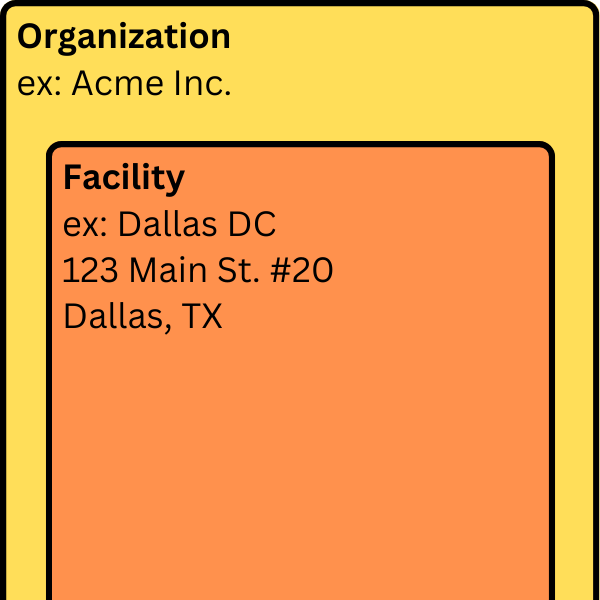
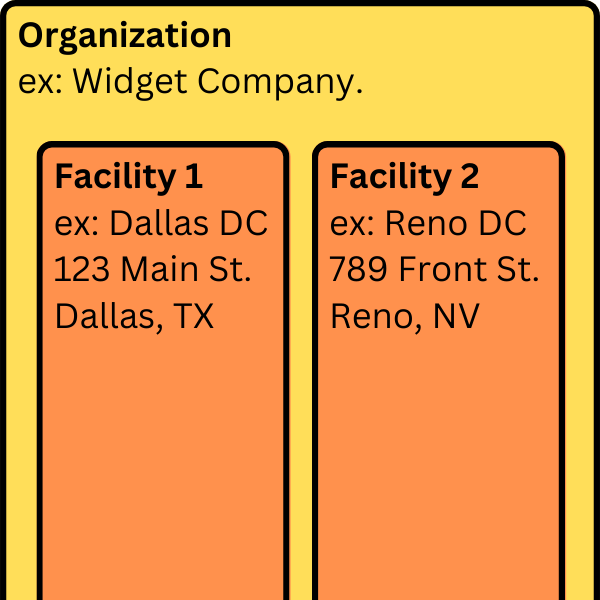
Example of organizations with one facility and more than one facility
In the example below:
Acme Inc. has only one facility called Dallas DC.
Widget Company has 2 facilities: one in Dallas and one in Reno.
 |  |
What types of settings are managed at each level?
Some settings, like Users exist at both the Organization & Facility level. To manage access to organizations and facilities see Roles and Permissions. To learn more, read our article about Organization Settings.
Other settings, like receiving hours, dock doors, capacity settings, and address exist only at the Facility level. To learn more, read our article on Facility Settings.
Frequently Asked Questions
Is there a limit to the number of facilities an organization can have?
No, Conduit is meant to be used across multiple facilities and scales seamlessly with roles and permissions that are customizable to each facility.
How are new facilities created?
To add a new facility, reach out to support@getconduit.ai. We will help you with set up and configuration.
Can a facility be shared with more than one organization?
In the case where a single facility is occupied by multiple tenants, then our recommendation is to have each tenant have its own organization representing their company and a specific facility underneath it typically associated with the suite the tenant occupies.
If I have multiple facilities next to each other, can I move appointments between buildings?
Yes! This is a configuration that we can turn on. By default, facilities are considered as separate from one another, which means appointments cannot be moved between facilities. Contact support@getconduit.ai to have this functionality turned on.