Tablet Check In
Last updated: May 28, 2025
Instructions
How To Check In For Your Appointment Online
Set up a tablet in your facility for drivers to check in. Once the tablet is set up, find your Tablet Check In link in the "Facility Settings" page of Conduit.
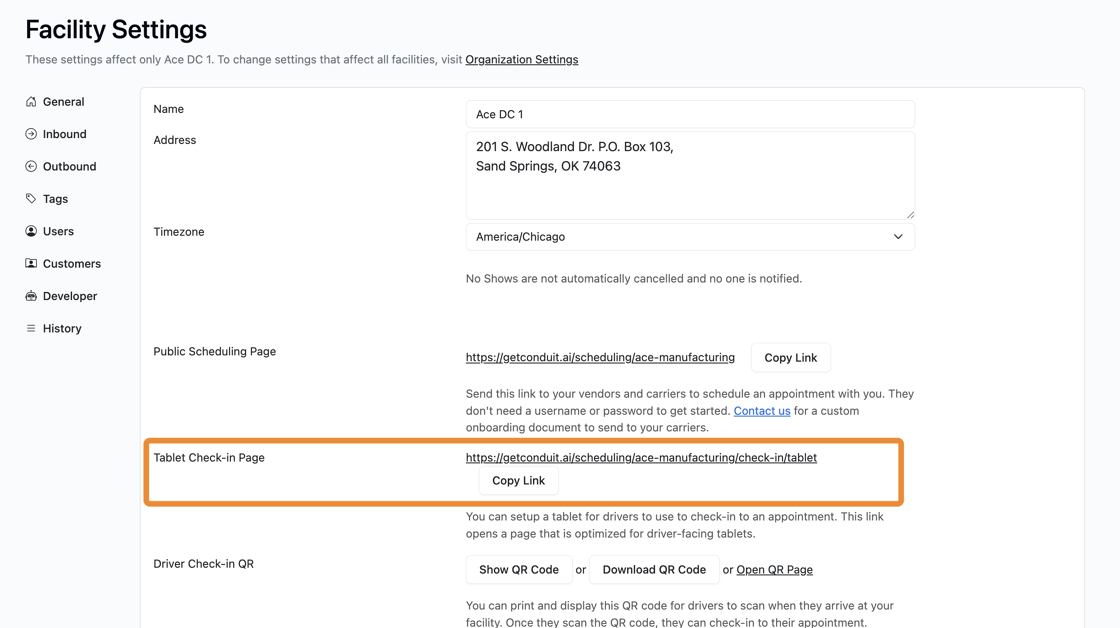
On the tablet, you will now see the driver check in workflow appear. The workflow is identical to the workflow shown in our article Contactless Driver Check In (QR Code). Please read that article for more information.
Frequently Asked Questions
How do I lock my tablet to a single page so that drivers cannot access other things?
This will vary by brand and model. Please work with your IT team on security for your tablet installation.
Can drivers take photos using the tablet check in?
Any tablet should allow you to take photos during this process, so long as you've set up permissions for your browser to use the camera. For support, please contact your internal IT team.