Integrations (WMS, TMS, & ERP)
Last updated: March 24, 2026
Overview
Conduit can be a complete standalone platform and does not need to be integrated with any other systems. This is the fastest way to get up and running with Conduit without any IT services required on your end.
While Conduit is a powerful system on its own, your organization can unlock additional capabilities by integrating the platform with your internal IT systems, such as your WMS, ERP, and/or TMS. Conduit’s integration capabilities are built in a modular way, so you can pick and choose which types of integrations meet your specific business needs.
Some of our customers start using Conduit as a standalone platform to gain immediate value from it while it is being integrated with their systems. Others choose to integrate Conduit with their IT systems before launching it. The upcoming sections will outline the types of integrations commonly made with the platform and the benefits they offer.
While the fastest way to integrate with Conduit is to use our existing APIs and Webhooks out of the box, Conduit also includes a custom integration platform layer that allows our system to send and receive data in any format. For example, if your WMS provider sends or receives XML payloads in a custom format, Conduit’s integration platform layer can support a plugin so that your system can communicate with Conduit in that custom XML format.
If your existing systems require you to use a communication protocol other than HTTP, Conduit can offer custom integrations such as EDI, SFTP, etc.
WMS
Conduit can integrate with many different WMS vendors, unlocking powerful capabilities such as:
Appointment booking validation
Syncing appointment data back to your WMS
Pre-filling appointment order/receive information
Booking Validation
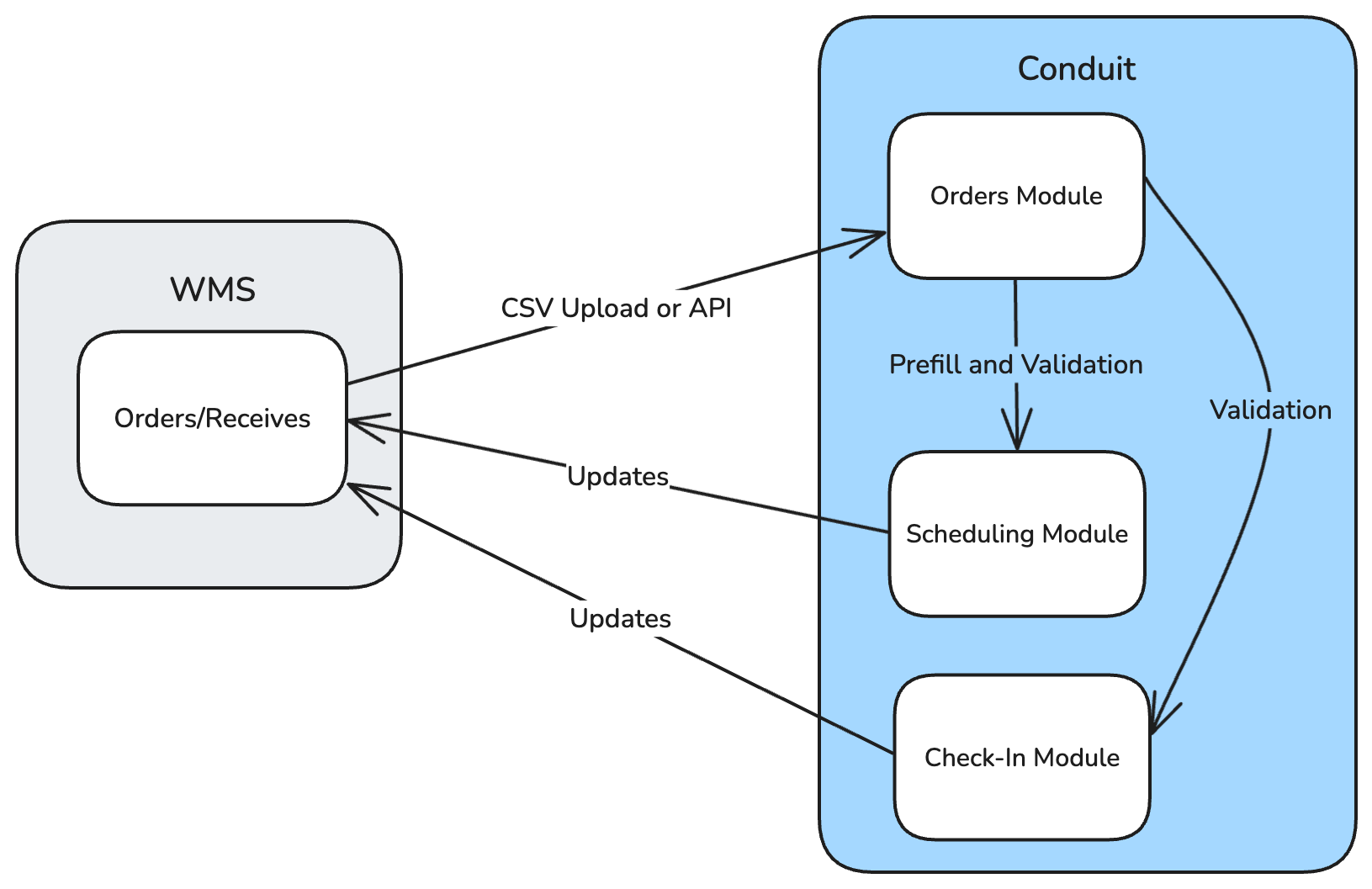
When an order/receive is created in your WMS or on a recurring schedule, your WMS can send the shipment information to Conduit. This allows Conduit to restrict or validate third-party bookings or driver check-ins to only those shipments your facility is expecting.
Appointment Sync
When your WMS sends orders/receives to Conduit, Conduit can send your WMS updates for any appointment events associated with that shipment. Conduit can inform your WMS of events such as the load being rejected due to damage to the trailer or when the shipment was delivered.
TMS
Conduit can integrate with various TMS vendors or any custom-built TMS that your organization currently uses. Integrating with your TMS enables the following capabilities.
Shipment Validation
When a shipment is booked via your TMS, your TMS can send the shipment information to Conduit. This allows Conduit to restrict or validate third-party bookings or driver check-ins to only those shipments your facility is expecting.
Appointment Invitations
When booking an appointment, third parties will go to your Conduit scheduling portal and fill out the required information you have configured to collect before booking. This flow works well for most appointments, but this process doesn’t prevent third parties from entering incorrect critical information for their appointment (intentionally or unintentionally), such as the type of freight or the PO number of the shipment. This can cause friction when the driver arrives at your facility to check in.
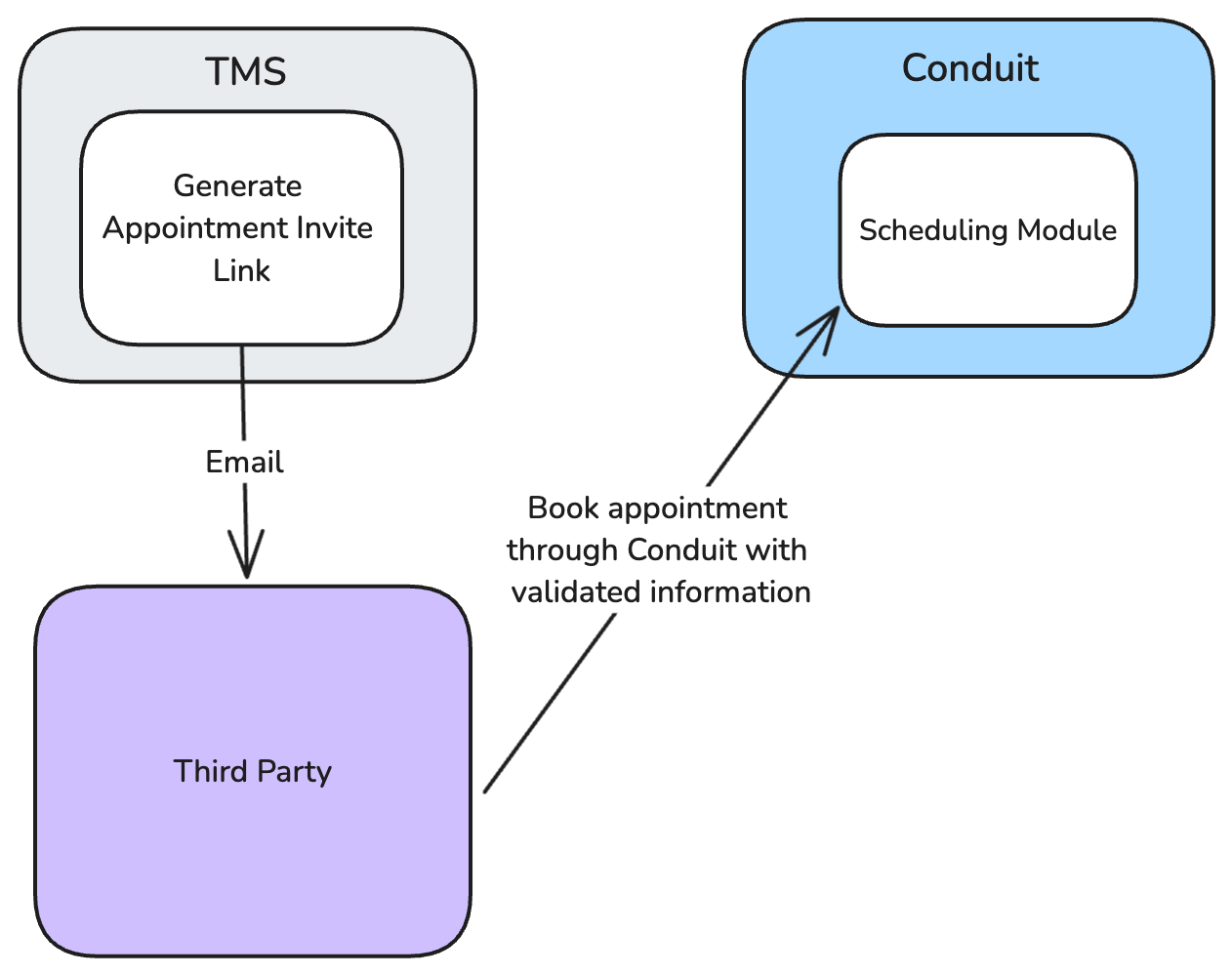
Your TMS (or any other IT system) can generate a Conduit appointment invitation link to send to a third party via email, inviting them to book an appointment at your facility. When the third party uses that link to book their appointment, you can configure which information is pre-filled and locked. The third party can use that link to book an appointment with all the correct information filled out and validated by your system.
In addition to preventing incorrect data entry, using appointment invitations can restrict third parties from booking on the Conduit platform unless they have been invited to book an appointment for a specific shipment.
Documentation for booking invitations can be found here.
External Scheduling
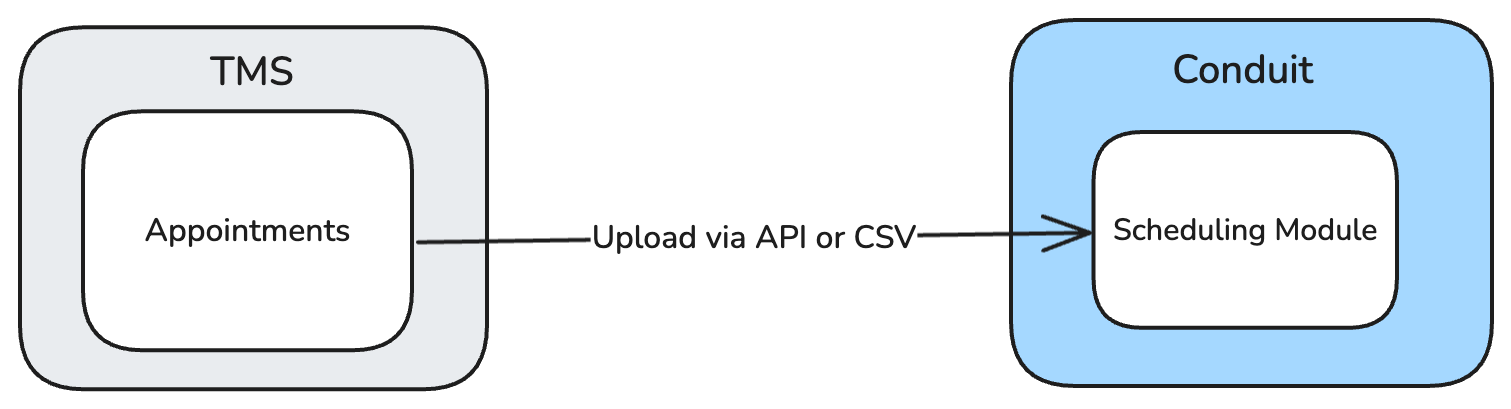
If your organization already manages its own appointment scheduling through your TMS, Conduit is able to import your existing scheduled appointments into the platform. With this approach, you are still able to benefit from the many other modules Conduit offers, such as driver check-in, load/unload, and yard management, even if Conduit’s scheduling module is not used.
APIs and Webhooks
Conduit is an API-driven platform, and we expose our core functionality via public APIs and webhooks. This enables any integration that doesn’t fit into the use cases described above to be built.
Conduit’s API documentation can be found here.
Multiple Integrated Systems
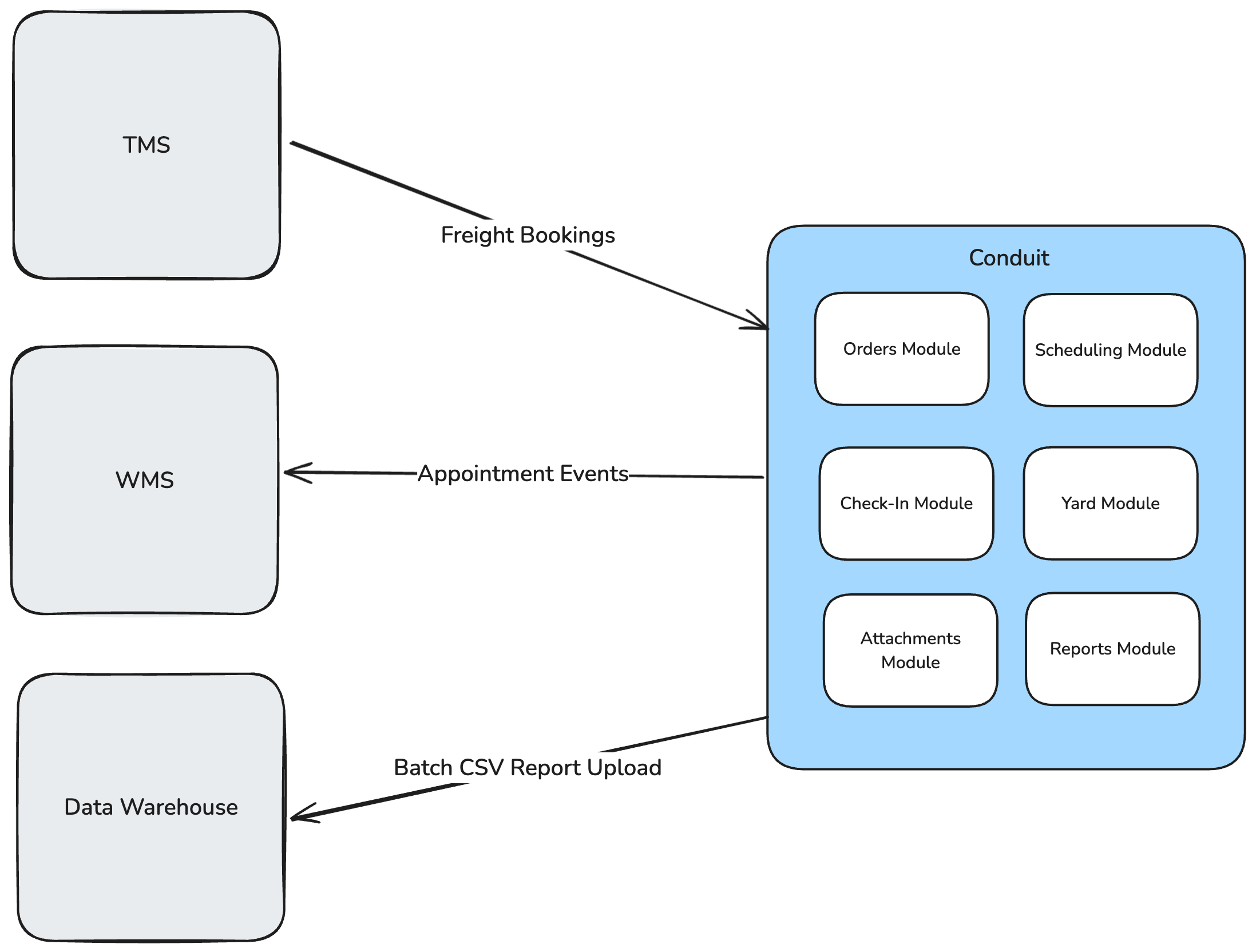
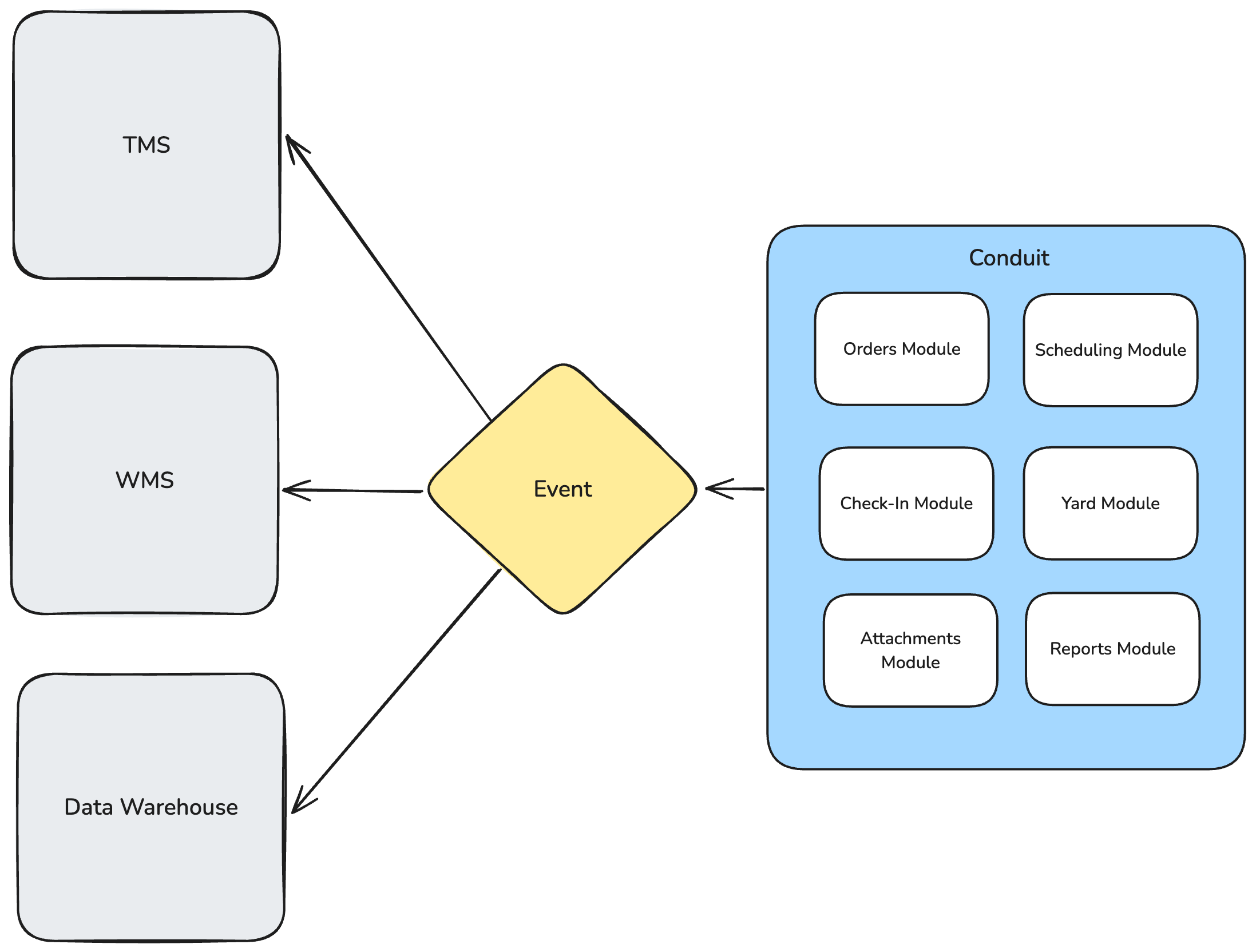
The example integrations discussed previously only demonstrated an integration with a single system at a time, but Conduit can both receive and send data from any number of systems. For example, some of Conduit’s customers integrate their TMS, WMS, and data warehouse to unlock the full potential of the platform.
An example of this could look like the diagram shown below:
Event Fanout
Events from Conduit can also be fanned out to any number of integrated systems (in different formats based on what is supported by the integrated system):
API Powered Scheduling
An example of how our APIs can be used is if your organization has its own in-house scheduling portal that you want to integrate with Conduit. Your organization could leverage Conduit’s APIs to book appointments directly into Conduit from your own portal.
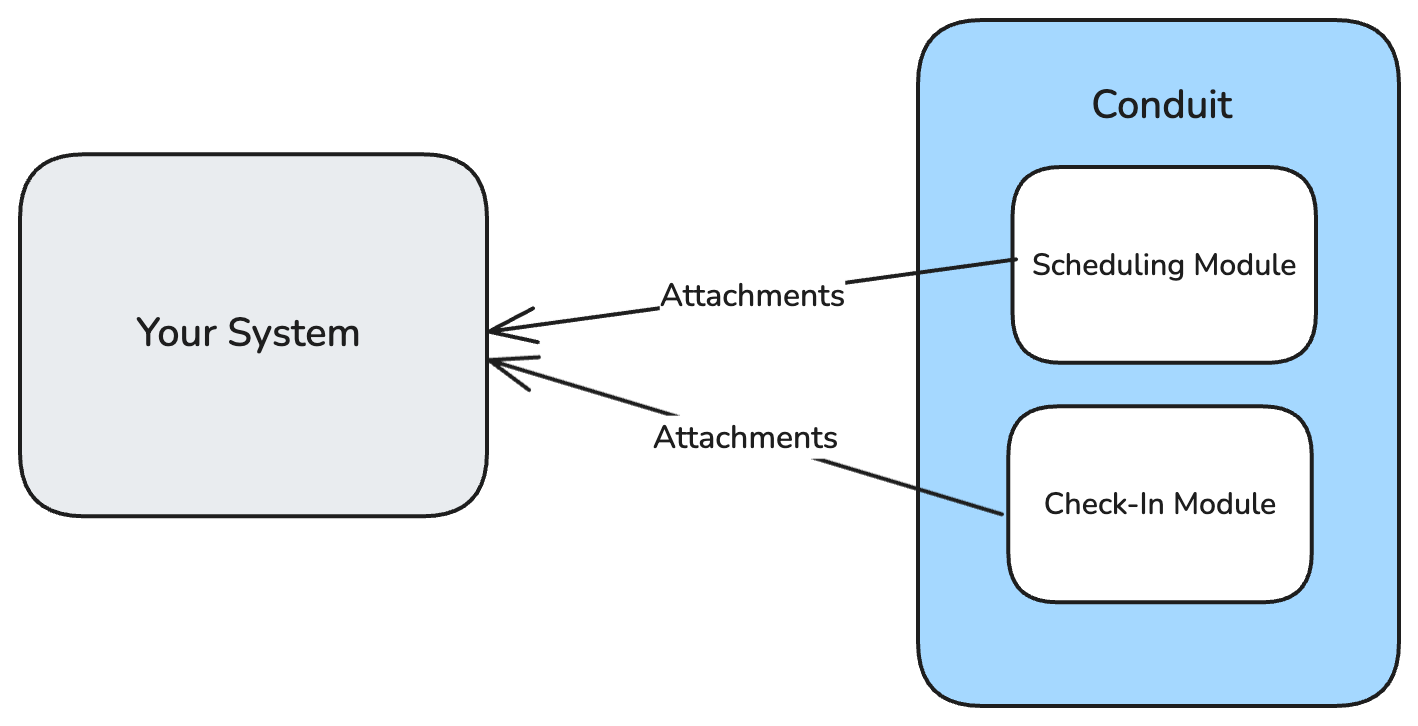
Appointment Attachment Sync
Conduit exposes core events in the system via webhooks that your organization can subscribe to. An example of this would be if you had an internal IT system and wanted appointment uploads made from Conduit into your system; Conduit can send these via a webhook into that system.
Data Warehousing
Conduit allows integrations to send all data available in the reporting module directly to your data warehouse platform. Some of the supported ways to get information from Conduit include:
pulling data from our API
Amazon S3
FTP
Custom integrations
Conduit contains a powerful reporting engine that can provide the data your team is interested in the format and delivery method of your choice. A common data integration pattern with Conduit is to have one or more custom reports delivered to an SFTP server or an S3 bucket as a set of CSV files on a regular cadence.
Other integration patterns such as pushing data directly into your data warehouse (Snowflake, Redshift, etc) are possible as well.
FAQ
How much does an integration cost?
Conduit will work with you to understand the needs of your integration, and provide a price based on the work required. Please contact sales@getconduit.ai to learn more.
Are there ongoing fees associated with an integration?
The cost structure of an integration will depend on the type and details of the integration.
If I want to integrate fields or a style of integration that is not listed here, can you do that?
Yes! Conduit will work with you to understand the request and provide a quote. Please contact sales@getconduit.ai to learn more.